ZorinOSにchromeRemoteDesktopを設定する
■最初にこのページを見ながら導入してみたけれど動かなかったので、対応内容をまとめておく(環境 ZorinOS16Lite:XFCE)
https://zenn.dev/karaage0703/articles/cfde5e6a4f43c3
手順はまず、chromeとgoogleRemoteDesktopをinstall
#chrome install
$ wget https://dl.google.com/linux/direct/google-chrome-stable_current_amd64.deb
$ sudo dpkg -i google-chrome-stable_current_amd64.deb
#chrome remote desktop install
$ wget https://dl.google.com/linux/direct/chrome-remote-desktop_current_amd64.deb -P ~/Downloads
$ sudo apt install ~/Downloads/chrome-remote-desktop_current_amd64.deb
# create setting folder
$ mkdir /home/manager/.config/chrome-remote-desktop/
# Xfce Light Locker Don't Exec Fix
$ sudo apt install xscreensaver
その後にブラウザで remotedesktop.google.com にアクセスして
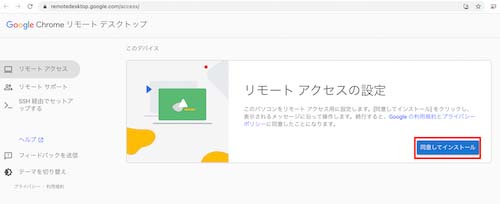
同意してインストールをクリックします。ダウンロードされたファイルは使用しません。その後に、PINを入力して、リモートアクセスの設定で「オンにする」という画面が出てくるので「オンにする」をクリックします。⬅問題はここから:オンにできない!!
色々調べたところ remotedesktop用のスクリプトにバグが有るようです。
attributeerror: module ‘xdg’ has no attribute ‘basedirectory’
bug-fix https://support.google.com/chrome/thread/226886368/
次のファイルを編集します。
sudo nano /opt/google/chrome-remote-desktop/chrome-remote-desktop
最初の方のimportの定義を変更します
import xdg → import xdg,xdg.BaseDirectory
あとは、このスクリプト実行したら動きました。XDG_CURRENT_DESKTOPを設定したらリモート接続したけど画面が真っ暗というのも解消しています。
echo "export $(dbus-launch)"  >> ~/.chrome-remote-desktop-session
echo "exec /etc/X11/Xsession" >> ~/.chrome-remote-desktop-session
echo "export CHROME_REMOTE_DESKTOP_DEFAULT_DESKTOP_SIZES=1280x720" >> ~/.profile
echo "export XDG_CURRENT_DESKTOP=XFCE">> ~/.profile
リモートデスクトップが動いているか確認するには次のコードを使用します。
sudo systemctl status chrome-remote-desktop@$USER
リモートデスクトップサービスを再起動するには次のコードを使用します。
sudo systemctl restart chrome-remote-desktop@$USER
おまけで、リモートデスクトップ接続した際にroot権限でファイルマネージャを起動した際に怒られて起動できないのですが、xhost +SI:localuser:rootを.bashrcに追加することで起動可能になります。 sudo thunar 等実行できます。
echo "xhost +SI:localuser:root >> ~/.bashrc